Explore the latest technical articles, warehouse automation trends, industrial robotics innovations, and practical guides from our engineering team.
Choosing the right Goods-to-Person Systems can reshape warehouse performance, labor use, and customer service. The decision begins with operational reality, not impressive machinery. A system that looks fast in a demonstration may struggle with dusty totes, irregular cartons, or seasonal order spikes.
René de Koster, a leading warehouse-operations scholar, offers a useful reminder: “A warehouse is a service facility, not a storage facility.” That idea should guide every evaluation. The best solution must support accurate picking, stable replenishment, safe movement, and practical maintenance. It should also fit the building’s ceiling height, floor strength, aisle layout, and available power. Small details matter. A blocked workstation can quietly reduce hourly output.
This guide presents seven practical tips for comparing Goods-to-Person Systems. It examines throughput, SKU variety, order profiles, integration, ergonomics, scalability, and total cost. It also considers implementation risk, because software delays and weak training can damage a promising project. Some calculations may look precise, yet demand forecasts remain uncertain. That is worth admitting. Your fastest option today may become restrictive after two years of growth.
Review vendor claims against measured warehouse data. Ask for references from facilities with similar order volumes and product characteristics. Watch the system during replenishment, not only during a polished demonstration. A reliable choice balances automation with human judgment. It does not simply chase maximum speed.
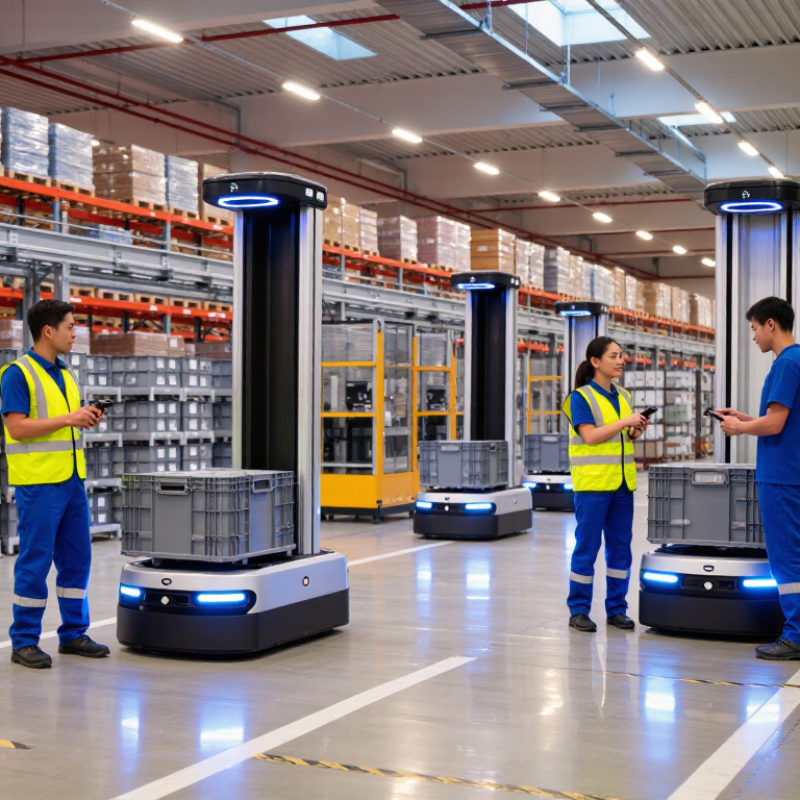
A goods-to-person system moves inventory to a worker, not workers to every shelf. Automated storage, shuttles, vertical lifts, conveyors, or mobile robots retrieve products from dense locations. The operator usually stands at a workstation, scans the tote, picks the required quantity, and returns the item. That short walk matters. The U.S. Census Bureau reported that e-commerce represented 16.1% of total U.S. retail sales in 2024, increasing pressure on fulfillment speed and accuracy. Goods-to-person designs help reduce travel, especially when orders contain small, frequently purchased items.
The technology is expanding, but it is not a universal answer. MHI’s 2024 Annual Industry Report found that 23% of respondents were using robotics and automation, while 75% expected adoption within five years. A system should match order profiles, SKU dimensions, replenishment patterns, labor availability, and future volume. Begin with the physical details: a 30-centimeter carton, a heavy spare part, or a fragile product may require different storage methods. Software integration matters equally. Weak inventory data can send the right worker to the wrong location. That is an expensive mistake.
Not every warehouse needs maximum automation. A smaller operation may gain more from better slotting and barcode discipline. A high-volume facility may justify multiple automated zones, buffer storage, and ergonomic picking stations. The difficult part is often not buying equipment. It is measuring real demand honestly. Industry reports offer useful direction, but each site still needs tested assumptions, pilot data, and room for failure.
A goods-to-person system should match your inventory, not simply fill available floor space. Measure usable cubic capacity, SKU count, product dimensions, and average inventory levels. Then map order profiles: lines per order, units per line, peak-hour volume, and the share of single-item orders. A system holding 20,000 small cosmetics may fail with bulky cartons. Storage density is useful only when workers can retrieve items quickly.
MHI’s 2024 Annual Industry Report found that 55% of supply chain leaders view innovation as a competitive differentiator. The same report indicated that 83% expect robotics adoption within five years. These figures support automation planning, but they do not replace site-specific analysis. Compare your fastest-moving 10% of SKUs with slow movers. Can the system place popular items near ergonomic picking positions? Can it handle seasonal surges without blocking replenishment?
Use historical data, not optimistic forecasts. Calculate peak-day demand and test unusual order combinations. A small bin can increase density, yet it may create replenishment work when products arrive in larger cartons. That trade-off is easy to miss. I would also review inventory accuracy, SKU growth, and future packaging changes. Many assessments focus on today’s capacity and quietly underestimate tomorrow’s complexity. Leave practical expansion space, even if the model looks less efficient on paper.
Tip 1: Map the real workflow before comparing technologies. A goods-to-person system should reduce walking, searching, and lifting. Measure order volume, item sizes, peak hours, and replenishment delays. A beautiful demonstration can hide practical weaknesses.
Tip 2: Match automation to inventory behavior. Shuttle systems suit dense storage and predictable movement. Autonomous mobile robots offer more flexibility when layouts change. Vertical lifts save floor space but may limit access speed. Compare throughput, storage density, energy use, and recovery time.
Tip 3: Study the system design, not only the machine. Ask whether bins, workstations, software, and conveyors operate as one process. Test how the design handles mixed orders and urgent requests.
Tip 4: Calculate the full cost. Include installation, maintenance, training, software updates, and spare parts. A lower purchase price may create higher labor costs later. I have seen teams overlook maintenance access. That mistake becomes expensive.
Tip 5: Challenge the peak-day plan. Average performance is not enough. Simulate promotions, seasonal spikes, missing inventory, and equipment downtime.
Tip 6: Protect human ergonomics. Adjustable stations, clear displays, safe walking routes, and manageable lifting heights matter every shift. People still matter.
Tip 7: Require measurable evidence. Request site references, test results, service response times, and integration details. No design is perfect. Leave room for manual work, because exceptions will appear. Review the decision with operators before signing, even when the spreadsheet looks convincing.
Start by mapping your real order profile, not an ideal spreadsheet. Count lines per order, product sizes, replenishment frequency, and peak-hour demand. In warehouse assessments, I compare normal and promotional-day volumes. Peak hours expose weaknesses. Ask the supplier to demonstrate sustained throughput, not a short burst. Watch where totes queue, operators wait, or software delays decisions. These small pauses can reduce daily output more than expected.
Accuracy needs evidence. Request a controlled test using your own product mix, including small items, irregular packaging, and similar-looking stock. Track picking errors, scanning exceptions, misroutes, and recovery time. A system that reaches high speed but creates rework is not efficient. Check how the interface guides workers and how quickly supervisors can investigate an error. Human factors matter. An awkward screen can quietly damage performance.
Scalability requires more than adding machines. Examine floor space, power, maintenance access, software integration, and future item growth. Model seasonal peaks and a second shift before making a decision. Growth changes everything. Ask for performance data from comparable operating conditions, while recognizing that every facility differs. The first estimate is often wrong. Run a pilot, document assumptions, and review the results with operations staff, not only executives. Also assess training time, spare-part availability, cybersecurity controls, and service response procedures. A flexible system should keep working when demand, labor, or product dimensions change.
7 Tips to Choose Goods-to-Person Systems
Calculate the full cost, not only the equipment price. Include software, installation, training, energy, and future upgrades. Ask for a five-year estimate. Costs hide there. Measure expected order volume, SKU variety, and peak-hour demand. A system that fits average demand may fail during seasonal surges. Leave physical space for expansion, inspections, and emergency access.
Check integration with your warehouse software, scanners, conveyors, and inventory data. Request a clear data map before signing anything. Confirm who owns operational data and how errors will be corrected. Integration should support real-time stock updates, exception handling, and simple employee workflows. Complex screens create hesitation. I once underestimated training time because the demonstration used perfect data. Real warehouses rarely do.
Treat safety as a daily operating requirement. Review guarding, access points, lifting height, noise, evacuation routes, and emergency stops. Ask for documented risk assessments and operator training records. Maintenance deserves equal attention. Confirm inspection intervals, spare-part availability, remote support, and repair response times. Calculate downtime costs honestly. A low-maintenance claim means little without service evidence. Run a small pilot with real workers and mixed orders. Test it live. Record mistakes, delays, blocked aisles, and uncomfortable movements. Then challenge your own assumptions before expanding the system.
| Tip | Decision Dimension | What to Evaluate | Useful Data or Planning Reference | Cost and Risk Implication | Recommended Evidence |
|---|---|---|---|---|---|
| 1 | Match the system to the order profile | Review SKU count, item dimensions, item weight, order-line frequency, daily order volume, peak demand, replenishment frequency, and required storage density. |
Measure: average and peak orders per hour, lines per order, inventory units, SKU velocity, and workstation presentation rate. Use at least 12 months of historical order data when available. |
A system optimized for average demand may become a bottleneck during seasonal peaks. Over-sizing the equipment increases capital cost and unused capacity. | ABC/velocity analysis, SKU master data, order-history extract, peak-season forecast, and a documented simulation or capacity model. |
| 2 | Compare total cost of ownership | Include equipment, software, installation, site preparation, integration, training, spare parts, energy, labor changes, service contracts, and eventual replacement costs. |
Use a 5-year or 10-year TCO model with separate assumptions for capital expenditure, operating expenditure, maintenance, labor, and downtime. Test low, expected, and high-volume scenarios. |
The lowest purchase price may not provide the lowest operating cost. Recurring software, support, and maintenance charges can materially affect the business case. | Itemized quotations, lifecycle-cost worksheet, payment schedule, warranty terms, service-level agreement, and sensitivity analysis. |
| 3 | Verify integration readiness | Check compatibility with the warehouse management system, enterprise resource planning system, order management system, warehouse controls, scanners, printers, and material-handling equipment. |
Define interface requirements for inventory updates, order release, task confirmation, exception handling, user access, audit trails, and real-time equipment status. Document data ownership and response-time expectations. |
Custom interfaces and unclear responsibilities can extend implementation time and increase project cost. Weak exception handling may create inventory inaccuracies. | Interface control document, API or message specifications, data-mapping file, integration test plan, cybersecurity review, and user-acceptance criteria. |
| 4 | Prioritize safety and ergonomics | Assess guarding, access control, emergency stops, safety scanners, restricted zones, manual handling, workstation height, reach distance, lighting, noise, and evacuation routes. |
Validate against applicable local regulations and recognized machinery-safety standards. Review lifting frequency, maximum item weight, repetitive motions, and operator posture during normal and exception work. |
Safety redesigns after installation can cause schedule delays and additional construction cost. Poor ergonomics may increase fatigue, errors, and injury risk. | Risk assessment, safety-circuit validation, ergonomic assessment, operator trial, training records, lockout/tagout procedure, and emergency-response plan. |
| 5 | Test maintenance and serviceability | Review preventive-maintenance intervals, access to wear components, diagnostic tools, fault recovery, spare-parts availability, technician coverage, and remote-support procedures. |
Track: mean time between failures, mean time to repair, planned-maintenance hours, critical spare lead time, and recovery time for common faults. Require documented escalation paths. |
Long repair times can reduce throughput and create manual-workaround costs. A system that requires specialist support for routine tasks may increase operational dependence. | Maintenance manual, spare-parts list, fault-history report, service-level agreement, technician training plan, and recovery drill. |
| 6 | Design for scalability and flexibility | Determine whether the system can add storage locations, workstations, robots, lifts, conveyors, or software functions without major reconstruction. |
Model at least three demand scenarios: current volume, expected growth, and peak or expansion volume. Check building height, floor loading, power capacity, fire protection, aisle clearance, and future expansion space. |
Insufficient capacity can force a second investment sooner than planned. Excessive modularity may raise initial cost without delivering immediate value. | Expansion layout, capacity curve, utility-load calculation, modular pricing schedule, change-order rules, and phased implementation plan. |
| 7 | Prove performance before full deployment | Use representative SKUs, real order mixes, peak conditions, replenishment tasks, returns, damaged items, empty-container handling, and system-recovery scenarios. |
Set measurable acceptance criteria for throughput, order accuracy, inventory accuracy, availability, workstation ergonomics, response time, and exception recovery. Separate average performance from peak performance. |
Early testing exposes bottlenecks before full installation. Acceptance criteria reduce disputes about whether the delivered system meets the operational requirement. | Proof-of-concept results, factory-acceptance test, site-acceptance test, performance dashboard, defect log, training sign-off, and go-live checklist. |
It brings stored items to a worker at a picking station. The worker scans, picks, and returns each tote. Less walking.
Common options include shuttles, vertical lifts, conveyors, and mobile robots. Each option suits different storage and order patterns. There is no universal choice.
It often helps facilities handling many small, frequently ordered items. Dense storage can reduce travel and save floor space. Large or fragile items may need another design.
Measure order lines, item sizes, peak hours, and replenishment delays. Then compare throughput, storage density, energy use, and recovery time. Watch the queues.
Use real products, including similar-looking stock and irregular packaging. Track errors, scanning exceptions, wrong routes, and recovery time. Fast picking can still create expensive rework.
Test promotions, seasonal surges, missing inventory, and equipment downtime. A short demonstration proves very little. Average speed is not enough.
Include installation, maintenance, training, software updates, and spare parts. Also consider power needs and maintenance access. The cheaper option may cost more later.
Adjustable stations, clear displays, and safe lifting heights support steady performance. Operators should review the design before approval. People notice practical problems first.
Possibly, but maximum automation may be unnecessary. Better slotting and barcode discipline could provide greater value. I would test this assumption.
Check future item growth, floor space, software integration, and labor changes. Model a second shift and seasonal peaks. The first estimate may be wrong.
Goods-to-Person Systems bring products directly to operators, reducing unnecessary travel and improving picking efficiency in warehouses and distribution centers. Choosing the right solution begins with understanding the operation’s storage requirements, inventory characteristics, order profiles, and expected growth. Businesses should compare different automation technologies and system designs based on available space, product variety, item dimensions, and workflow requirements rather than focusing on a single feature.
A well-planned evaluation should also consider throughput, picking accuracy, scalability, and the system’s ability to handle seasonal demand. Beyond performance, decision-makers need to review total costs, including equipment, installation, software, energy, training, and ongoing maintenance. Seamless integration with existing warehouse systems is essential for reliable data exchange and process control. Safety features, operator ergonomics, access management, and service support should also be assessed. By balancing operational goals, long-term flexibility, and practical implementation needs, companies can select a Goods-to-Person Systems solution that improves productivity while supporting sustainable warehouse growth.